서버단 (SpringBoot + MyBatis + PostgreSQL)
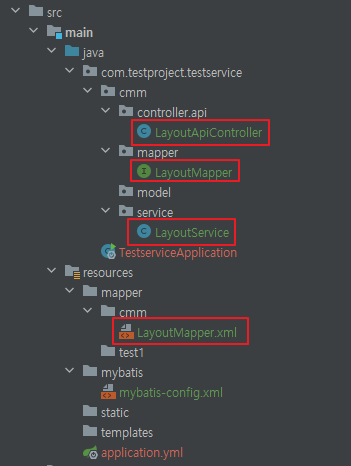
LayoutApiController.java
@Slf4j
@RestController
@RequestMapping("/api/layout")
@RequiredArgsConstructor
public class LayoutApiController {

    private final LayoutService layoutService;

    // layout 가져오기
    @GetMapping("getLayout")
    public ResponseEntity<Map<String, Object>> getLayout(@RequestParam("page") String page) {
        try {
            // layout 조회
            List<Map<String, Object>> layout = layoutService.selectLayoutByPage(page);

            // 응답 데이터
            Map<String, Object> response = Map.of("result", layout);

            // 성공 응답 반환
            return ResponseEntity.ok(response);
        } catch (Exception e) {
            // 예외 처리: 로그 남기고 에러 메시지 반환
            log.error("Error retrieving layout for page {}: {}", page, e.getMessage());

            // 실패 응답
            Map<String, Object> errorResponse = Map.of("result", "error", "message", "An error occurred while retrieving the layout.");
            return ResponseEntity.status(500).body(errorResponse);  // HTTP 500 에러 반환
        }
    }


    // layout 저장하기
    @PostMapping("saveLayout")
    public ResponseEntity<Map<String, Object>> saveLayout(@RequestBody List<Map<String, Object>> layoutList) {
        try {
            // 디버깅
            for (Map<String, Object> map : layoutList) {
                System.out.println("id: " + map.get("id")); // null이면 프론트에서 잘못 보낸 것
            }

            layoutService.saveLayout(layoutList);

            // 성공 응답
            Map<String, Object> response = Map.of("result", "success");
            return ResponseEntity.ok(response);

        } catch (Exception e) {
            log.error("Error saving layout: {}", e.getMessage());
            Map<String, Object> errorResponse = Map.of("result", "error", "message", "An error occurred while saving the layout.");
            return ResponseEntity.status(500).body(errorResponse);
        }
    }

}
LayoutService.java
@Service
@RequiredArgsConstructor
public class LayoutService {

    private final LayoutMapper layoutMapper;

    // layout을 페이지별로 조회하는 메서드
    public List<Map<String, Object>> selectLayoutByPage(String page) throws Exception {
        try {
            // 데이터베이스에서 레이아웃을 조회
            return layoutMapper.selectLayoutByPage(page);
        } catch (Exception e) {
            // 예외가 발생하면 로깅하거나 특정 예외를 던질 수 있습니다.
            throw new Exception("Error fetching layout for page: " + page, e);
        }
    }

    // layout을 저장하는 메서드
    public void saveLayout(List<Map<String, Object>> layoutList) throws Exception {
        if (!layoutList.isEmpty()) {
            try {
                // 주어진 페이지에 대해 기존 레이아웃을 삭제
                layoutMapper.deleteLayoutByPage((String) layoutList.get(0).get("page"));

                // 새로운 레이아웃을 삽입
                for (Map<String, Object> item : layoutList) {
                    System.out.println(item.toString());
                    layoutMapper.insertLayout(item);
                }

            } catch (Exception e) {
                // 예외가 발생하면 로깅하거나 예외를 던집니다.
                System.out.println(e.getMessage());
                throw new Exception("Error saving layout data", e);
            }
        }
    }
}
LayoutMapper.java
@Mapper
public interface LayoutMapper {

    // Layout 조회 (page를 인자로 받아서 List<Map<String, Object>> 반환)
    List<Map<String, Object>> selectLayoutByPage(@Param("page") String page);

    // Layout 삭제
    void deleteLayoutByPage(@Param("page") String page);

    // Layout 삽입 (Map<String, Object>를 item으로 전달)
    void insertLayout(Map<String, Object> item);
}
LayoutMapper.xml
<?xml version="1.0" encoding="UTF-8"?>
<!DOCTYPE mapper PUBLIC "-//mybatis.org//DTD Mapper 3.0//EN"
        "http://mybatis.org/dtd/mybatis-3-mapper.dtd">

<mapper namespace="com.nivuskorea.sb_sewer.cmm.mapper.LayoutMapper">
    <!-- 페이지별 레이아웃 조회 -->
    <select id="selectLayoutByPage" parameterType="String" resultType="map">
        SELECT id, x, y, w, h, page
        FROM layout_config
        WHERE page = #{page}
        ORDER BY id
    </select>

    <!-- 페이지별 레이아웃 전체 삭제 -->
    <delete id="deleteLayoutByPage" parameterType="String">
        DELETE FROM layout_config
        WHERE page = #{page}
    </delete>

    <!-- 레이아웃 저장 -->
    <insert id="insertLayout" parameterType="map">
        INSERT INTO layout_config (id, x, y, w, h, page)
        VALUES (#{id}, #{x}, #{y}, #{w}, #{h}, #{page})
            ON CONFLICT (id,page)
		DO UPDATE SET
            x = EXCLUDED.x,
            y = EXCLUDED.y,
            w = EXCLUDED.w,
            h = EXCLUDED.h,
            page = EXCLUDED.page;
    </insert>

</mapper>
위치정보를 디비에 저장하기위해 테이블을 생성해야합니다.
DB table
CREATE TABLE layout_config (
	id varchar(50) NOT NULL,
	page varchar(50) NOT NULL,
	x int4 NOT NULL,
	y int4 NOT NULL,
	w int4 NOT NULL,
	h int4 NOT NULL,
	is_edit bool NULL DEFAULT false,
	create_dt timestamp NULL DEFAULT now(),
	update_dt timestamp NULL DEFAULT now(),
	CONSTRAINT layout_config_pk PRIMARY KEY (id, page),
	CONSTRAINT layout_config_un UNIQUE (id, page)
);
위치 조정하게 되면 아래와같이 디비에 저장됩니다.

테스트용 api
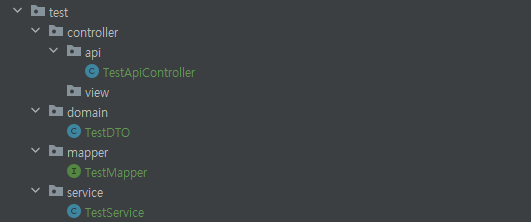
TestApiController
@Slf4j
@RestController
@RequestMapping("/api/test")
@RequiredArgsConstructor
public class TestApiController {

    private final TestService Service;

    @GetMapping("randomData")
    public ResponseEntity<Map<String, Object>> ajaxPtnInfluent(){
        Map<String, Object> response = new HashMap<>();

        response.put("jsonTest", Service.selectTest());
        return ResponseEntity.ok(response);
    }
}
TestDTO
@Data
@AllArgsConstructor
@NoArgsConstructor
public class TestDTO {
    private String musrDt;
    private double val;
}TestMapper
@Mapper
public interface TestMapper {

    TestDTO selectTest();
}TestService
@Service
@RequiredArgsConstructor
public class TestService {
    private final TestMapper mapper;

    public TestDTO selectTest(){return mapper.selectTest();}
}
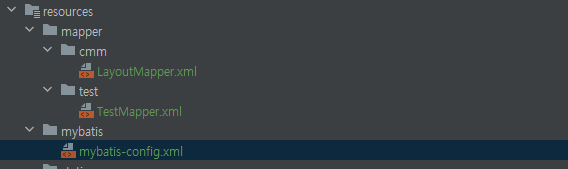
TestMapper.xml
<?xml version="1.0" encoding="UTF-8"?>
<!DOCTYPE mapper PUBLIC "-//mybatis.org//DTD Mapper 3.0//EN"
        "http://mybatis.org/dtd/mybatis-3-mapper.dtd">

<mapper namespace="com.testproject.testservice.test.mapper.TestMapper">
    <!-- 페이지별 레이아웃 조회 -->
    <select id="selectTest" resultType="TestDTO">
        SELECT msur_dt,val
        from test_table
        order by msur_dt
        limit 1;
    </select>
</mapper>
mybatis-config.xml
<?xml version="1.0" encoding="UTF-8"?>
<!DOCTYPE configuration PUBLIC "-//mybatis.org//DTD MyBatis 3.0//EN" "http://mybatis.org/dtd/mybatis-3-config.dtd">

<configuration>
    <!-- 기타 설정들 -->
    <settings>
        <!-- 예시: 언더스코어를 카멜 케이스로 변환 -->
        <setting name="mapUnderscoreToCamelCase" value="true"/>
        <!-- 파라미터에 Null 값이 있을 경우 에러 처리 -->
        <setting name="jdbcTypeForNull" value="VARCHAR"/>
    </settings>

    <!-- 별칭을 명시적으로 지정 -->
    <typeAliases>
        <!-- TemplateVO 클래스에 대한 별칭 지정 -->
        <typeAlias type="com.testproject.testservice.test.domain.TestDTO" alias="TestDTO"/>

        <!-- 여기에 필요한 alias 추가작성-->

    </typeAliases>
</configuration>
프론트단(리액트)
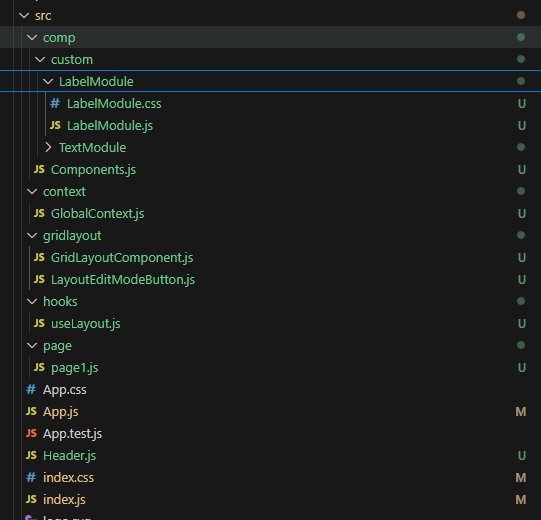
npm설치
npm install react-grid-layout
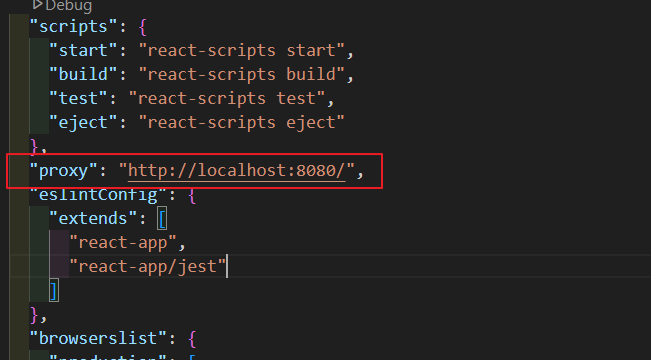
백엔드(8080)와 통신을 위해 package.json에 proxy를 추가해줍니다.
GridLayoutComponent.js
// GridLayoutComponent.js
import React from 'react';
import RGL, { WidthProvider } from "react-grid-layout";
import "react-grid-layout/css/styles.css";
import "react-resizable/css/styles.css";

const ReactGridLayout = WidthProvider(RGL);

const GridLayoutComponent = ({
  layout,
  handleLayoutChange,
  isEditMode,
  components,
  ob
}) => {
  return (
    <ReactGridLayout
      className="layout"
      layout={layout}
      onLayoutChange={handleLayoutChange}
      cols={400}
      rowHeight={5}
      width={1200}
      compactType={null}
      isDraggable={isEditMode}
      isResizable={isEditMode}
      preventCollision={true}
      bounds="parent"
      maxRows={180}
      margin={[0, 0]}
    >
      {layout.map((item) => {
        const Comp = components[item.i];
        return (
          <div
            key={item.i}
            style={{ width: "100%", height: "100%" }}
            className="p-2 shadow rounded bg-white"
          >
            {ob[item.i] && <Comp ob={ob[item.i]} />}
            {isEditMode && <p style={{ transform: 'translate(10px, -25px)' }}>{item.i}</p> }
          </div>
        );
      })}
    </ReactGridLayout>
  );
};

export default GridLayoutComponent;
LayoutEditModeButton.js
import React from 'react';

const EditModeButton = ({ isEditMode, setIsEditMode }) => {
  return (
    <button
      style={{
        position: "absolute",
        top: "15px",
        right: "280px",
        zIndex: 99999999
      }}
      onClick={() => setIsEditMode((prev) => !prev)} // 버튼 클릭 시 모드 토글
    >
      {isEditMode ? "보기모드" : "편집모드"}
    </button>
  );
};

export default EditModeButton;
useLayout.js
import { useState, useEffect } from 'react';
import axios from 'axios';

const useLayout = (page, isEditMode, components) => {
  const layoutUrl = "/api/layout/getLayout";
  const saveLayoutUrl = "/api/layout/saveLayout";
  const [layout, setLayout] = useState([]);

  // 동적으로 defaultLayout 생성
  const defaultLayout = Array.from({ length: Object.keys(components).length }, (_, index) => ({
    i: `ob${index + 1}`,  // ob1, ob2, ..., ob5
    x: 0,
    y: 0,
    w: 30,
    h: 10
  }));

  useEffect(() => {
    console.log(components);  // components가 변경될 때만 로그 찍기

    const fetchLayout = async () => {
      try {
        const res = await axios.get(`${layoutUrl}?page=${page}`);
        if (res.data && Array.isArray(res.data.result) && res.data.result.length > 0) {
          const fetchedLayout = res.data.result;

          // 레이아웃 데이터가 기존 레이아웃과 다르면 업데이트
          const updatedLayout = defaultLayout.map(item => {
            const dbItem = fetchedLayout.find(fetched => fetched.id === item.i);
            if (dbItem) {
              return { ...dbItem, i: item.i };  // id 설정
            } else {
              return { ...item, id: item.i, page };  // id와 page를 함께 설정
            }
          });

          // layout이 실제로 변경되었을 때만 상태 업데이트
          if (JSON.stringify(updatedLayout) !== JSON.stringify(layout)) {
            setLayout(updatedLayout);

            // `isEditMode`가 `true`일 때만 저장
            if (isEditMode) {
              await axios.post(saveLayoutUrl, updatedLayout, {
                headers: { 'Content-Type': 'application/json' },
              });
            }
          }
        } else {
          setLayout(defaultLayout);
          if (isEditMode) {
            await axios.post(saveLayoutUrl, defaultLayout, {
              headers: { 'Content-Type': 'application/json' },
            });
          }
        }
      } catch (error) {
        console.error('레이아웃 가져오기 실패', error);
        setLayout(defaultLayout);
      }
    };

    fetchLayout();
  }, [page, layoutUrl, saveLayoutUrl, isEditMode]); // isEditMode가 변경될 때만 실행

  const handleLayoutChange = (newLayout) => {
    // layout을 수정한 후, `isEditMode`가 `true`일 때만 저장
    const layoutWithIdAndPage = newLayout.map(item => ({
      ...item,
      id: item.i, // 반드시 id를 포함해야 DB 저장 시 null 에러 없음
      page,
    }));

    // layout이 실제로 변경되었을 때만 상태 업데이트
    if (JSON.stringify(layoutWithIdAndPage) !== JSON.stringify(layout)) {
      setLayout(layoutWithIdAndPage);

      // `isEditMode`가 `true`일 때만 레이아웃 저장
      if (isEditMode) {
        axios.post(saveLayoutUrl, layoutWithIdAndPage, {
          headers: { 'Content-Type': 'application/json' },
        })
          .then(() => console.log('레이아웃 저장됨'))
          .catch((err) => {
            console.error('레이아웃 저장 실패', err);
            alert("레이아웃 저장 실패: " + err.message);
          });
      }
    }
  };

  return { layout, handleLayoutChange };
};

export default useLayout;
사용법
수정O 부분에
반드시 ob1 ob2 형식으로 데이터 추가
page1.js
import React, { useState, useEffect } from "react";
import axios from "axios";
import * as MI from "../comp/Components";
import GridLayoutComponent from "../gridlayout/GridLayoutComponent";
import EditModeButton from "../gridlayout/LayoutEditModeButton";
import useLayout from "../hooks/useLayout"; // 공통 훅 사용

const Layout = () => {
  // 수정X(처음개발시 수정)
  const page = 'page1';
  const url = "/api/test/randomData"; // 데이터 불러오는 URL

  // 수정X
  const [ob, setOb] = useState({});
  const [isEditMode, setIsEditMode] = useState(false);

  // 수정O(데이터 추가시)
  const components = {
    ob1: MI.LabelModule
  };

  // useLayout 훅 사용
  const { layout, handleLayoutChange } = useLayout(page, isEditMode, components);

  // 데이터를 API로부터 받아오는 부분
  useEffect(() => {
    const fetchData = async () => {
      try {
        const res = await axios.get(url);
        const dataKeys = [
          "jsonLabels"
        ];
        const dataArray = {};
        dataKeys.forEach((key) => {
          dataArray[key] = res.data[key];
        });
        setOb({
          ob1:{
            name:'jaewonlee',
            val:220,
            unit:'kg'
          }
        });
      } catch (error) {
        console.error("데이터 불러오기 실패", error);
      }
    };
    fetchData();
  }, [url]);

  return (
    <>
      <EditModeButton isEditMode={isEditMode} setIsEditMode={setIsEditMode} />
      <div className="contents">
        <GridLayoutComponent
          layout={layout}
          handleLayoutChange={handleLayoutChange}
          isEditMode={isEditMode}
          components={components}
          ob={ob}
        />
      </div>
    </>
  );
};

export default Layout;
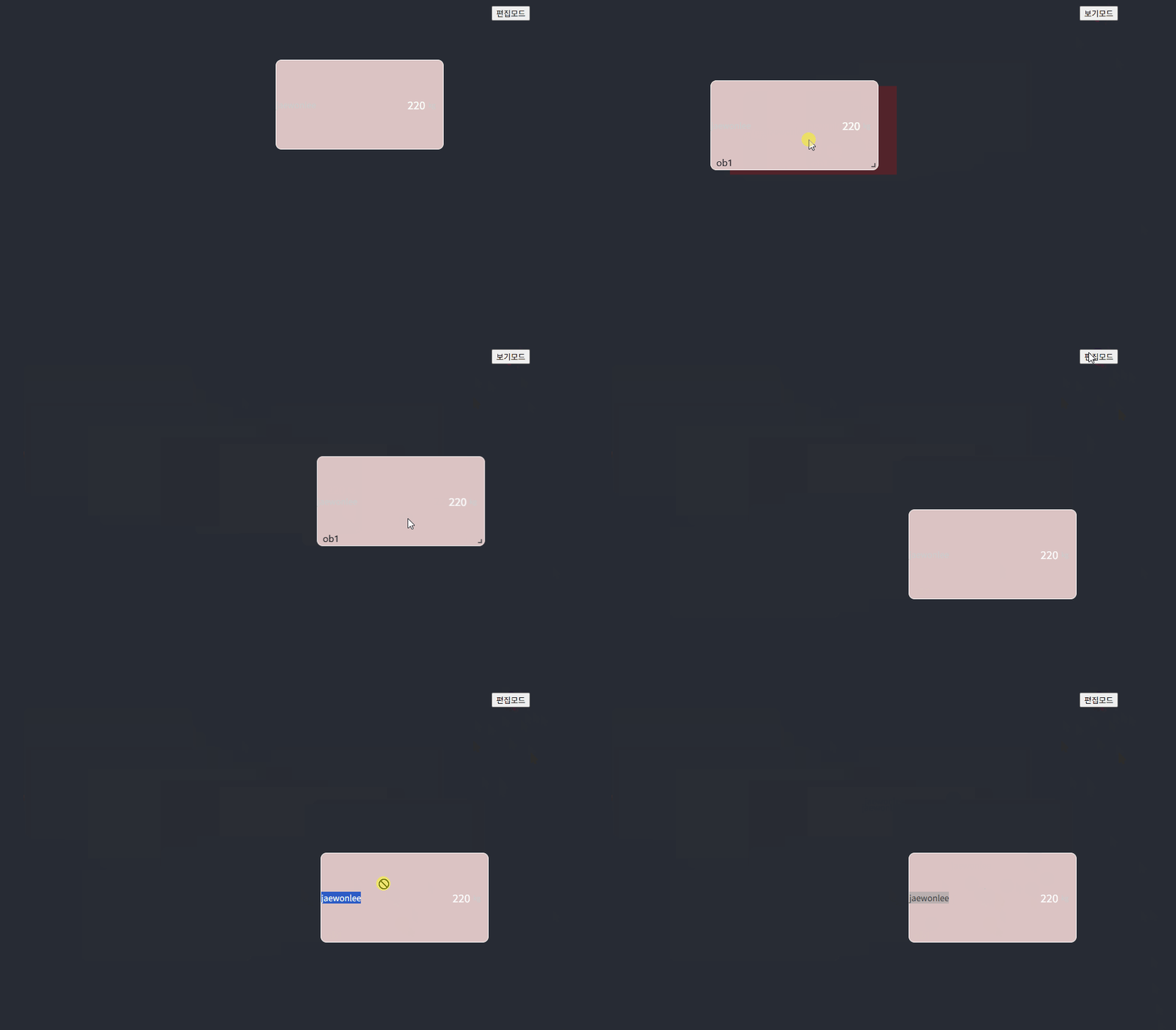
결과
반응형
'프론트엔드 > ⚛️ React' 카테고리의 다른 글
| validateDOMNesting:Whitespace text nodes cannot appear as a child of <tr> 에러 (0) | 2025.05.28 |
|---|---|
| Source Map (0) | 2025.05.26 |
| React | useRef (1) | 2024.05.03 |
| 리액트에서 innerHtml 표시하기 (0) | 2024.04.25 |
| React | useEffect (0) | 2024.04.21 |